MyVyBZ Support

How can we help? Search for an answer or send us a support request.

Notices & Subscriptions · Updated November 13, 2026

How to Subscribe to MyVyBZ

How to Subscribe to MyVyBZ

First; Open your MyVyBZ Hud or go to a MyVyBZ Info Kiosk.
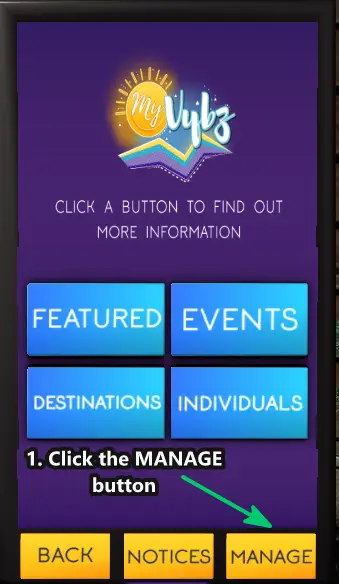
1. Click on MANAGE 
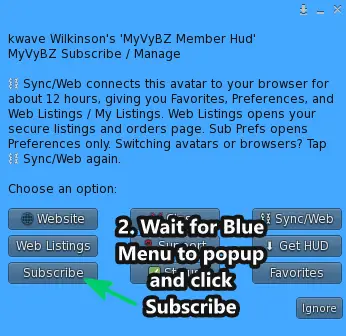
2. Then click on Subscribe from the blue menu
*Also anytime you buy a listing or use sync\web on MyVyBZ for verification code to sync, these will auto subscribe you. This is so it can sync the menu and your listings/content to you. You can always unsubscribe, but just know that if you ever use verification codes or buy or need to renew listings or want to access Free-Sub only features, you will have to be subscribed. As always Subscribing/Using MyVYBZ is free. Only thing that costs is buying/renewing listings.
Still need help?

If this article did not solve it, send us the details and we’ll take a look.

Share article

Was this helpful?

Sync this browser from your MyVyBZ HUD or Info Kiosk to rate this article.

Expanded screenshot