MyVyBZ Support
How can we help? Search for an answer or send us a support request.
Help & Known Fixes
AllGeneralFeaturesAccount & Web SyncMy ListingsOrders & PaymentsSupportInfo Kiosk / HUDEventsDestinationsIndividualsSponsorsPostsNotices & SubscriptionsReferrals / CommissionPayment KioskTroubleshooting
Get Support, Request a Feature, or Report a Bug
How to get support, request a feature, or report a bug
Get Support, Request a Feature, or Report a Bug
How to get support, request a feature, or report a bug
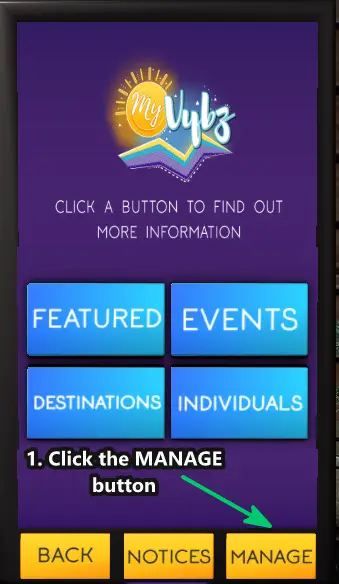
First; Open your MyVyBZ Hud or go to a MyVyBZ Info Kiosk.
1. Click on MANAGE
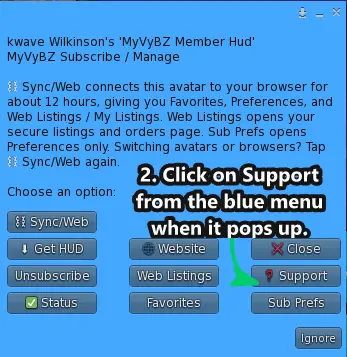
2. Then click on Support from the blue menu when it pops up.
3. Click the link, go to page button or right click and copy url and paste it in your preferred web browser.
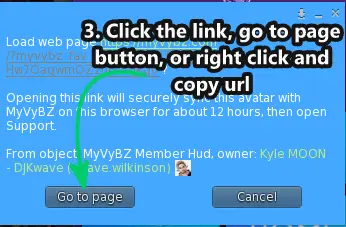
- If not subscribed it will take you straight to https://myvybz.com/support to submit a ticket. If you are subscribed it will Sync with the web so you can sync with your own account in a cached synced session for up to 12 hours. Please select the category under what do you need? that best matches your ticket.
Still need help?
If this article did not solve it, send us the details and we’ll take a look.
Was this helpful?
Sync this browser from your MyVyBZ HUD or Info Kiosk to rate this article.